
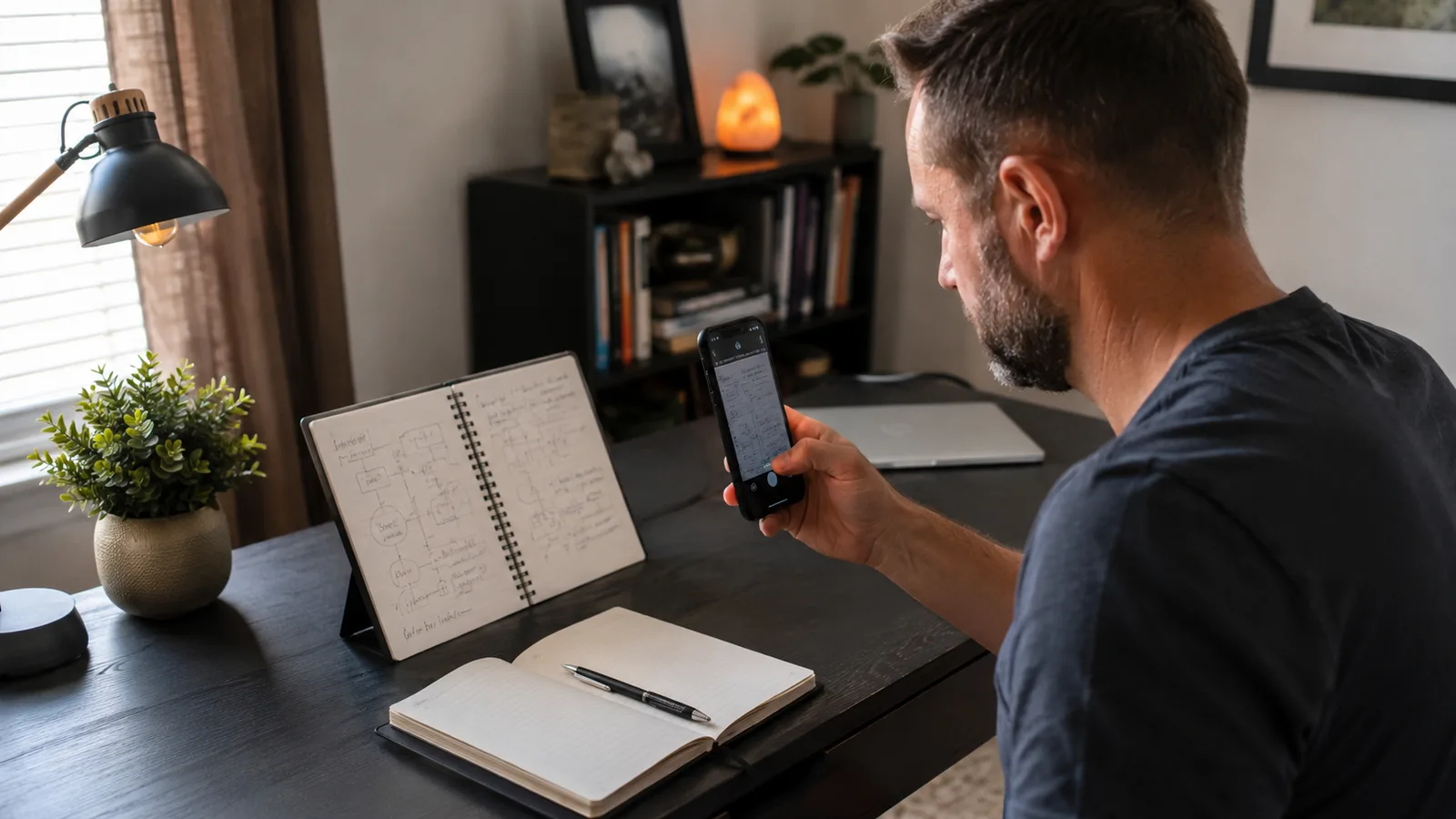
I'm Nate Colburn. I've run remote IT projects out of a spare bedroom for eight years, and I bought a Rocketbook Flip back in the spring after getting tired of digging through a drawer of half-used spiral notebooks for one specific meeting note. I've already written the long-term version of this review, the one covering a full year of use. This is a different piece. This is the version where I stop being diplomatic about the parts that don't match the marketing photos, because the Rocketbook Flip has a 4.6-star average on Amazon with nearly five thousand reviews behind it, and that number is honest as far as it goes, but it smooths over a handful of specific quirks that only show up once you're using this thing the way you'd actually use a notebook: fast, a little messy, half distracted on a call.
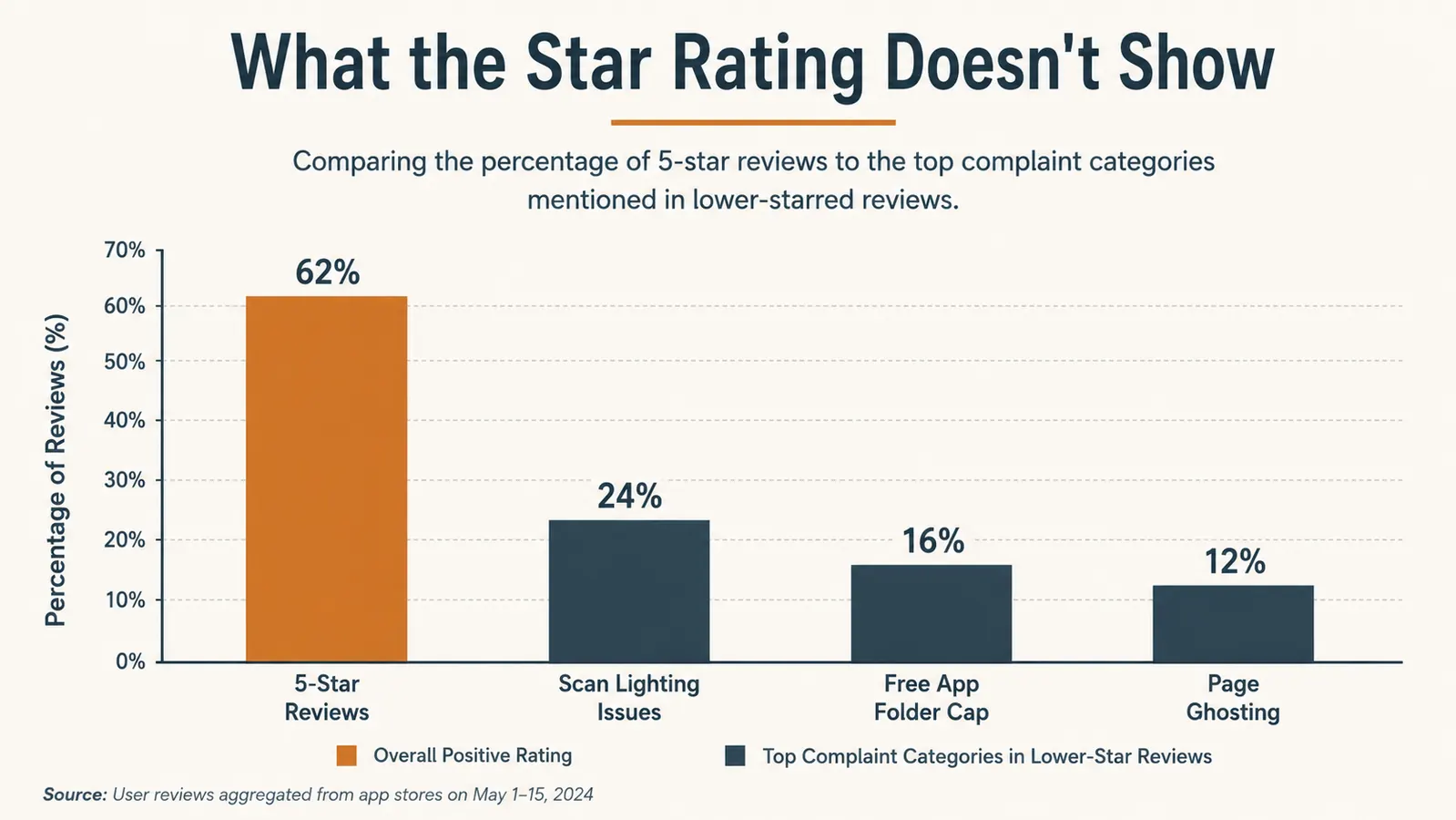
A 4.6 average tells you most buyers are happy. It does not tell you what happens when the lighting in your kitchen is bad and the scan comes out with a glare line across your handwriting. It doesn't tell you that the free version of the app caps how many places you can send a scanned page. It doesn't tell you what the pages actually look like after month five, once the novelty of wiping a page clean has worn off and you're doing it the way I do, in ten seconds between calls, not carefully following the instructions. That's the gap this review is trying to close.
None of this means the Rocketbook Flip is a bad product. I still use it every workday. But I'd rather you go in knowing exactly what I know now than find these things out the way I did, mid-scan, three weeks in, wondering if I'd bought a dud.
The Quick Verdict
A genuinely useful reusable notepad once you accept its real limits: an app that needs decent lighting and a folder cap on the free tier, and pages that show faint ghosting if you don't wipe them properly. Worth it, but with a learning curve the star average doesn't show.
Amazon Check Today's Price →Wondering If the Rocketbook Flip Lives Up to Its Own Hype?
It mostly does, but not without a few quirks nobody mentions in the five-star reviews. Here's the unfiltered version before you decide, and where to check today's price on Amazon if you want to see for yourself.
Amazon Check Today's Price on Amazon →How I Actually Tested This
I didn't just scan one clean page under good lighting and call it done. Over five months I've used the Rocketbook Flip in the exact conditions I actually work in, my desk lamp on in the morning before the sun's fully up, natural window light by midday, and the overhead ceiling fixture in the evening when I'm wrapping up notes from a late call with a client on the West Coast. That variation matters, because a scanning app that performs flawlessly under one consistent studio light in a demo video behaves very differently across three different lighting setups in a real spare bedroom over five months.
I also didn't baby the pages. On the long-term side of this review I mentioned following the wipe instructions carefully. For this one, I want to be honest that most days I don't. I give the page a quick pass with the towel between calls, the way most people actually will, not a careful two-handed scrub with water every single time. That's where some of the durability issues below come from, and I think it's a more useful test than a perfectly maintained demo unit, because it's closer to how you'll actually treat yours.
I also specifically tried to break the app's folder system on purpose, adding destinations past what felt reasonable, just to see where the free tier actually stops you. And I let the notepad sit unscanned for over a week at one point, on purpose, to see what happens to a page that's been written on, partially wiped, and rewritten before I finally got around to scanning it. Some of what follows only shows up if you push the system past the tidy, ideal-conditions use case the product photos show.
The Scanning Isn't as Instant as the Ads Make It Look
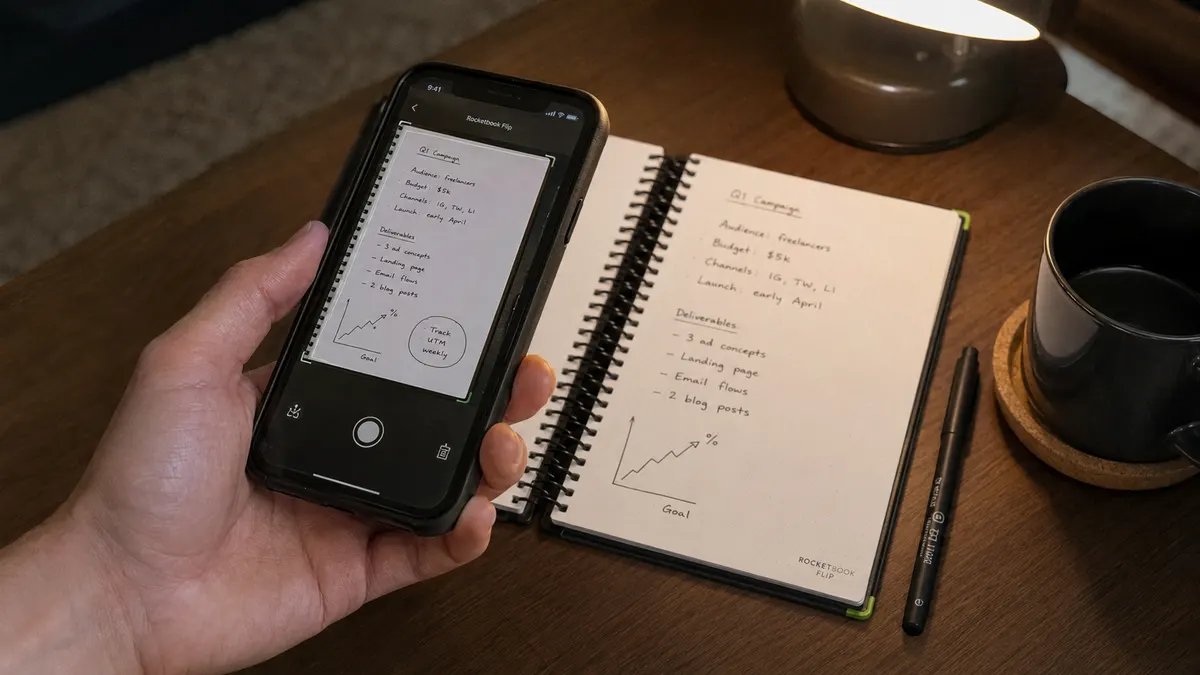
The Rocketbook Flip's whole pitch rests on the scanning step, and in good light, it really is close to instant, you tap the folder icon, hold your phone over the page, and the app auto-detects the edges and captures it in under a second. What the marketing doesn't show is what happens under my desk lamp at 6:45 in the morning before the sun's up, which is my actual note-taking window most days. The warm, slightly yellow light from the lamp creates a soft glare across the glossy-ish page surface, and the app's edge detection struggles, sometimes cropping the scan a half inch short on one side, cutting off a column of numbers I needed.
The fix is simple once you know it, angle the phone slightly off perpendicular instead of holding it dead flat above the page, which breaks up the glare enough for the app to grab the full page. Nobody tells you that in the box. I figured it out by trial and error after re-scanning the same page four times one morning, annoyed, before finally tilting the phone and getting a clean capture on the fifth try. It's a two-second habit once you know it, but the first two weeks with the Rocketbook Flip involved more re-scans than the demo videos would ever suggest.
The other scanning quirk is that the app occasionally misreads which folder icon I tapped, especially when I'm rushing between back-to-back meetings and my thumb lands slightly off the small icon. Twice now I've had a client-facing meeting note land in my personal notes folder instead, and once found a grocery list sitting in a folder meant for sprint planning notes. It's not a dealbreaker, everything's still searchable regardless of folder, but it's a small trust issue with a feature that's supposed to be the whole point of the icon system.
The Free App Has a Ceiling You'll Hit Faster Than You Think
The Rocketbook app is free to download and use, and for a while that feels like the whole story. It isn't. The free tier caps you at a small number of scan destinations, the folders each icon routes to, and once you hit that cap, the app starts nudging you toward a paid subscription to unlock more. I run three folders, work, personal, and one for a side project, and I'm right up against the limit. If you're picturing a setup with a dozen client folders or one per project, you will hit that ceiling within your first month, not your first year.
The subscription itself isn't unreasonable if you decide you need it, but the point is that the free version implied on the box and in most of the Amazon reviews isn't quite the full unlimited experience some of those five-star write-ups make it sound like. I stayed on free by keeping my folder count small on purpose, which meant compromising on how granular my organization actually is. I'd rather have had that tradeoff explained on the packaging than discover it three weeks in while trying to add a fourth folder for a new client engagement.
There's also a sync delay that shows up more than I expected. Most of the time a scan lands in my Google Drive folder within a few seconds. Occasionally, maybe once every couple of weeks, it sits in a pending state for several minutes with no clear reason why, and once it never synced at all until I force-closed and reopened the app. That's happened three times in five months, which isn't often, but it's happened at least once during a moment I needed the note immediately, right after a call, before I'd forgotten a number a client had given me verbally.
What Happens to the Pages When You Don't Baby Them
This is the part I think the star average hides the most. The Rocketbook Flip's pages wipe clean with the included damp towel, and when you do it carefully, with water and a real scrub, they come back looking close to new. When you do it the way I actually do most days, a fast pass between calls with whatever moisture is left on the towel from the last wipe, you get faint ghosting on pages with heavy pen pressure, underlines, or boxed-in numbers. I've got six or seven pages now with a soft gray shadow of old notes still faintly visible underneath whatever's currently written there.
It doesn't affect legibility of the current page, and I want to be fair about that, the ghosting is subtle enough that it's never actually confused me about what I'm reading. But it's a real gap between the always-looks-brand-new impression the product photos give and what a page looks like after five months of realistic, slightly rushed use. If you're the type who will follow the wipe instructions to the letter every single time, you probably won't see this. If you're like me and treat it like an actual working notepad instead of a demo unit, budget for some cosmetic wear.
The pen matters here too, and it's worth being specific. The Rocketbook Flip only wipes clean with Pilot FriXion ink, and the tip on the included pen has worn down noticeably faster than a normal ballpoint would, something about the slightly textured page surface seems to grind it down. I'm on my second FriXion refill in five months, which is a small recurring cost nobody flags upfront, and losing or misplacing that specific pen is a bigger deal here than losing a regular pen would be with any other notebook, because a normal pen won't wipe off at all.
Where the Five-Star Reviews Oversell It
I read through a good chunk of the reviews on Amazon before buying, and a lot of them describe the Rocketbook Flip in language that suggests a frictionless, permanent fix for paper clutter. It's a genuinely good product, but that framing sets an unrealistic bar. It still requires you to scan before you wipe, with no undo if you forget. It still only works properly with one specific pen. It still has an app with a free-tier ceiling that isn't obvious until you hit it. None of that shows up in a five-star headline that just says something like life-changing or best purchase of the year.
Compare the Rocketbook Flip to what it's actually replacing, a drawer full of spiral notebooks you can never find anything in, and it's a clear upgrade, searchable notes, one physical object instead of a dozen, no more digging. Compare it to some imagined perfect digital notebook that never glitches, never needs a specific pen, and never shows a hint of wear, and of course it falls short, because that product doesn't exist at this price or probably any price. The gap between those two comparisons is exactly where the inflated reviews live.

The One Thing That Actually Surprised Me
For as critical as I've been in this review, there's one part of the Rocketbook Flip that's genuinely exceeded what I expected, the handwriting search. I was skeptical the optical character recognition would handle my handwriting, which isn't great, especially when I'm scribbling fast during a status call. It's been more accurate than I predicted. I searched for a client's last name a few weeks ago from a note I'd scanned back in month two, and it pulled up the right page in seconds, despite my handwriting looking rushed and half-illegible even to me. That's the one feature where the Rocketbook Flip has quietly beaten my expectations every time I've actually needed it, rather than just tested it.
The dot grid on the dotted side has also held up as more useful than I expected going in. I sketch quick database diagrams and boxed-in numbers during planning calls, and the faint dots keep everything aligned in a way that plain lined paper never did for me. It's a small thing, but it's the kind of detail that's stayed useful every single week rather than being a one-time novelty.
What I Liked
- Handwriting search is genuinely accurate, even on rushed, messy notes
- Dot grid side is legitimately useful for quick diagrams and sketches
- One notepad replaces a drawer full of spiral notebooks, with searchable notes instead of guessing which one
- No batteries or charging, works with a pen you keep clipped right into the spiral
- Durable core hardware, spiral coil and cover have held up fine after five months
Where It Falls Short
- Scanning under warm or dim lighting causes glare and cropped edges more often than the demo videos suggest
- Free app tier caps folder destinations, worth checking your setup against the limit before assuming it's unlimited
- Quick, realistic wiping leaves faint ghosting on heavy pen strokes over time, not the always-new look in the photos
- Only wipes clean with Pilot FriXion pens, and the included pen's tip wears down faster than expected
- Occasional sync delays and folder mis-taps, rare but inconvenient when they happen right after a call
A 4.6-star average tells you most people are happy. It doesn't tell you your kitchen lamp will make the scan cut off a column of numbers, or that the free app caps you at three folders. Nobody's five-star review mentions that.
Who This Is For
If you're someone who takes notes in a fairly consistent spot with decent, even lighting, and you're willing to keep a couple of FriXion refills on hand and follow the actual wipe instructions most of the time, the Rocketbook Flip's quirks will barely register. It's a genuinely good fit for anyone drowning in half-used paper notebooks who wants one searchable place for meeting notes, and who's realistic that any app-connected product needs a short adjustment period rather than working perfectly on the first try.
Who Should Skip It
If you take notes in inconsistent lighting, moving between a dim kitchen table and a bright office depending on the day, expect more scanning re-tries than the marketing suggests. And if you're picturing a dozen separate project folders on the free app, or you know you won't remember to scan before wiping a page, the Rocketbook Flip is going to frustrate you in specific, avoidable ways. It's still a solid product. It's just not the frictionless, always-perfect tool the best reviews make it sound like.
Now You Know What the Star Rating Doesn't Show
Scanning quirks, a free-tier folder cap, and pages that ghost a little if you rush the wipe. None of it's a dealbreaker for me five months in, but you deserve to know before you buy. Check today's price on Amazon and see if it fits how you'd actually use it.
Amazon Check Today's Price on Amazon →