

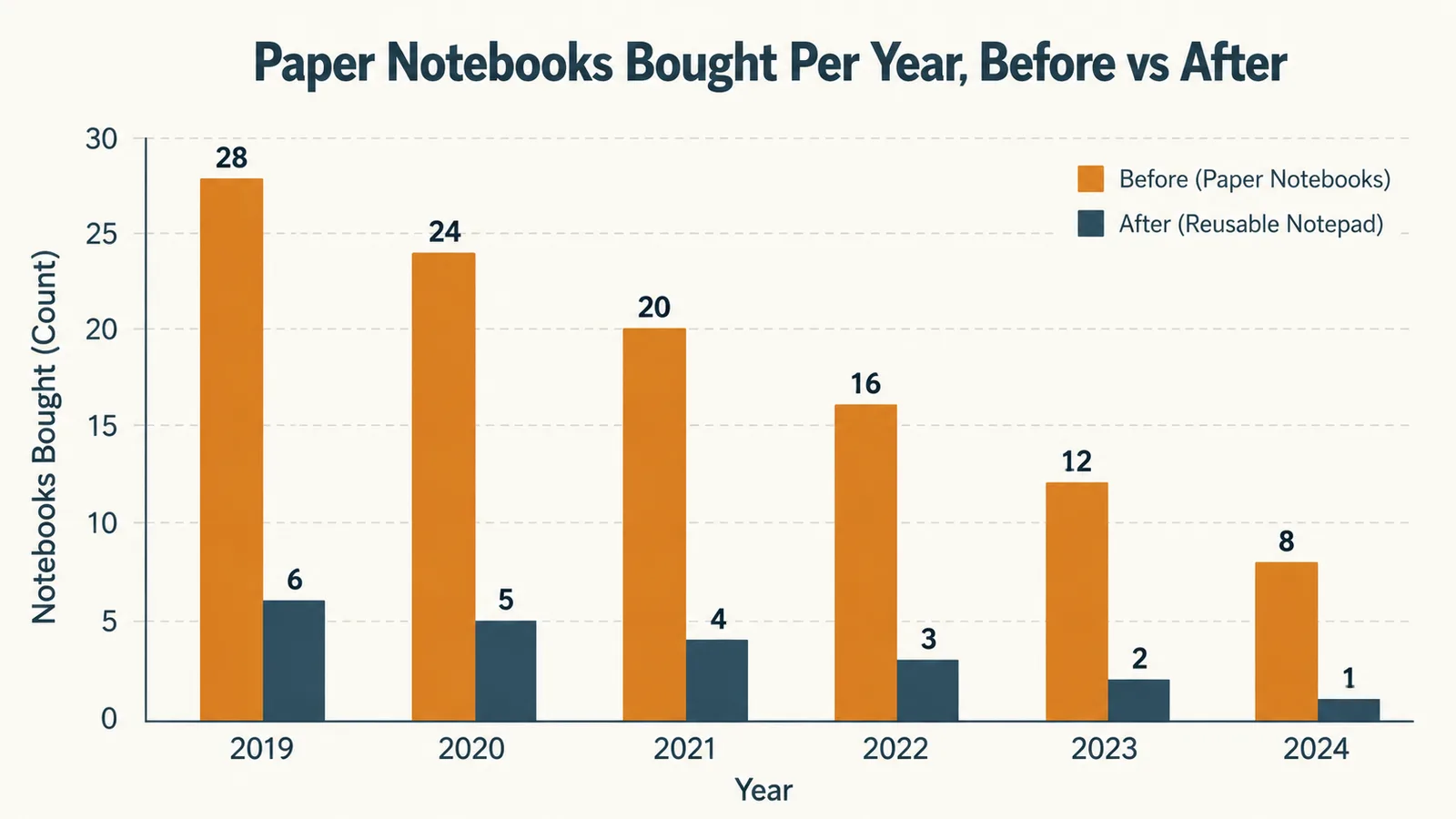
My name is Nate Colburn, and I've worked remote IT project management for going on eight years now, out of a spare bedroom in my house that I've slowly turned into an actual office. For most of that time I went through paper notebooks the way some people go through coffee, one every six or seven weeks, filled with meeting notes, sprint numbers, and phone jottings I'd flip back through maybe twice before the whole thing got shoved in a drawer. Somewhere around the eighteen-month mark of a particularly document-heavy client engagement, I counted eleven half-used spiral notebooks stacked in a drawer and decided that was dumb. A coworker had mentioned the Rocketbook Flip a few months earlier, a reusable smart notepad you write in with a regular pen, scan with your phone, and then wipe clean and use again. I ordered one that same afternoon.
That was just over a year ago. I've filled and wiped the same Rocketbook Flip notepad somewhere around forty times since then, taken it into probably three hundred meetings, and used it as the single place I capture everything from sprint planning notes to my kid's soccer schedule. This review is what I actually learned using the Rocketbook Flip as a daily work tool, not a novelty item that gets tried once and forgotten in a drawer with everything else.
When the box showed up, it looked and felt like a normal spiral notebook, letter size, top-bound so the pages flip up like a steno pad rather than side-bound like a composition book. Inside were forty-two pages, a mix of lined and dotted layouts, a Pilot FriXion pen clipped into the spiral, and a small damp microfiber towel folded into a pouch on the inside back cover. Setup was genuinely just downloading the free Rocketbook app, scanning the QR code printed on the first page, and picking which cloud folders I wanted my notes to land in. Five minutes, tops, and most of that was me deciding between Google Drive and Dropbox.
Quick Verdict
The Quick Verdict
A genuinely useful reusable notepad that's replaced eleven paper notebooks a year with one, once you accept it only works with the specific FriXion pen and needs an occasional real wipe-down, not just a swipe.
Amazon Check Today's Price →Tired of Stacking Half-Used Notebooks in a Drawer?
If your desk drawer looks like mine did before I switched, the Rocketbook Flip is the same fix that got eleven spiral notebooks a year down to one. Check current availability and see today's price on Amazon.
Amazon Check Today's Price on Amazon →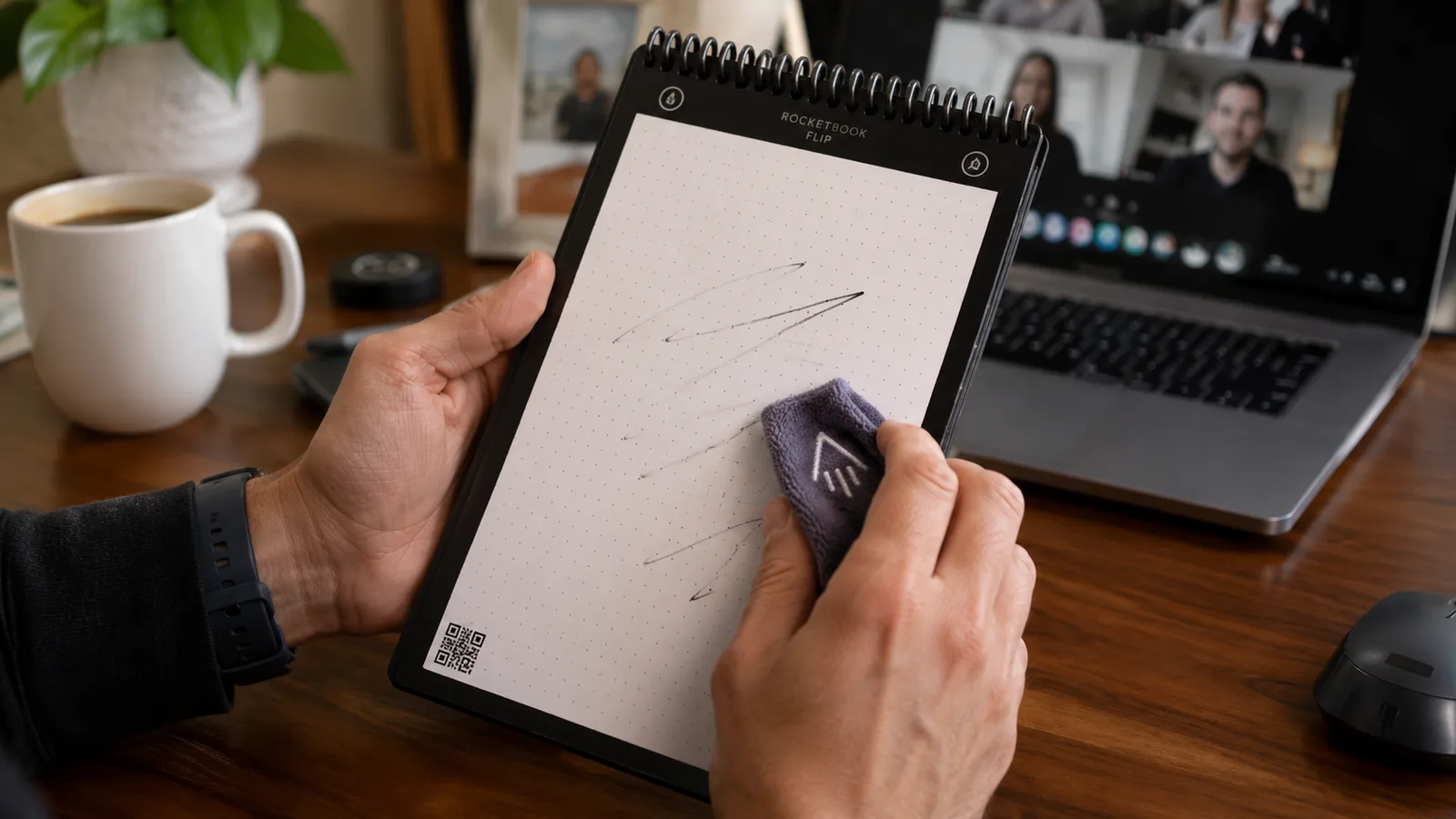
How I've Used It
My routine is nothing fancy. The Rocketbook Flip sits open on my desk next to my keyboard through most of the workday, angled so I can flip a page without knocking my mouse off its mat. I use the dotted side for anything with numbers or diagrams, sprint burndown sketches, quick database relationship boxes, and the lined side for straight meeting notes. When a page fills up, I either scan it right then with the app or let two or three pages stack up and batch-scan them at lunch.
I run four to five meetings most weekdays, and the Rocketbook Flip goes into every one of them, whether that's a fifteen-minute morning stand-up with my own team or a longer status call with the mid-size logistics company I've been supporting on a ticketing system migration for the past several months. The scanning part is the piece that actually changed my habits. Each page in the notepad has seven small icons printed along the bottom, and before scanning I tap the one that corresponds to where I want that page filed, one folder for client notes, one for internal team stuff, one for personal. The app reads that icon and routes the scan there automatically, which sounds minor until you realize it means I stopped losing track of which notebook had which client's notes in it, because there's only ever one notepad.
I've also taken the Rocketbook Flip on two work trips, tucked flat into a laptop bag alongside a charger and not much else. It doesn't need batteries, doesn't need to be charged, and survived both trips without a mark on the cover beyond a little edge wear that's honestly barely noticeable a year in.
The Pen, the Pages, and Why It Only Works With One Kind of Ink
The single biggest thing to understand about the Rocketbook Flip before you buy it is that the wipe-clean trick only works with Pilot FriXion pens, a specific ink that turns clear under enough friction heat, which is exactly what happens when you scrub the page with the included damp towel. Any other pen, and you've got permanent ink on a notepad that's a lot more expensive per page than a regular spiral notebook if it doesn't wipe off. The Rocketbook Flip ships with one FriXion pen clipped into the coil, and I bought a three-pack of refills within the first month once I realized how often the tip catches on the slightly textured synthetic paper and wears down faster than it would on regular paper.
The pages themselves feel like a cross between laminated cardstock and a dry-erase surface, not quite as slick as I expected from the marketing photos. Writing on the dotted side, I found the dot grid genuinely helpful for keeping sketches and boxes lined up, something plain paper never gave me. The lined side is standard rule spacing, comfortable for normal note-taking without feeling cramped.
Wiping a page clean takes about ten seconds with the microfiber towel, but I learned early on that a quick swipe isn't enough. Heavy pen pressure, especially where I'd underlined something twice or boxed in a number, needs a real scrub with a little water added to the towel, not just a dry pass. The Rocketbook Flip comes with instructions for this, and I ignored them the first week, which left faint ghost marks on two pages that never fully disappeared.
A Year of Scanned Meeting Notes
The real test of any note-taking system isn't the first week, it's whether you're still using it correctly seven or eight months in without the habit falling apart. The Rocketbook Flip has held up better than any paper system I've tried. I've scanned somewhere north of two hundred pages over the year, and the app's optical character recognition, which turns handwriting into searchable text, has been accurate enough that I can search my own scrawl for a client name or a date and actually find the meeting I'm thinking of, something I could never do digging through a stack of old spiral notebooks.
The habit that stuck the hardest is scanning before I wipe a page. I've forgotten exactly twice in a year, both times during weeks I was traveling and rushed, and both times I lost notes I actually needed later. That's a me problem more than a Rocketbook Flip problem, but it's worth flagging, because the entire system depends on you scanning before you clean, and there's no undo once a page is wiped.
On the durability side, the spiral coil is still tight, the cover hasn't delaminated, and the pages haven't developed the waxy buildup I half expected after forty rounds of writing and wiping. Two pages near the front do show a faint shadow from that first week I didn't wipe correctly, but the other forty are essentially indistinguishable from new. For a single notepad standing in for what would have been eleven or twelve paper notebooks over the same year, that's held up better than I expected going in.
The Tradeoffs I've Made Peace With
I want to be straight about the parts of the Rocketbook Flip that aren't perfect, because the marketing makes it sound like a frictionless swap for paper, and it isn't quite that. First, you're locked into FriXion pens specifically. I've tried a regular ballpoint on a scrap corner just to see, and it doesn't wipe off at all, so if you're the type to grab whatever pen is closest, this system requires a small behavior change up front.
Second, the app's folder icons are a genuinely good idea, but the free version of the app caps how many destinations you can send to before it starts nudging you toward the paid tier. I've stayed on the free version fine for a year by keeping my folder structure simple, three destinations, but if you're picturing a dozen different project folders, budget some time to figure out whether the free tier covers your setup.
Third, the top-bound spiral means the Rocketbook Flip flips up steno-pad style rather than opening flat like a normal notebook. I actually like this for one-handed note-taking during calls, but if you're used to writing across a two-page spread, it's a different motion to get used to.
Last, heavy-handed writers need to actually follow the wipe instructions, water and a real scrub, not a dry swipe. I learned that the hard way on two pages that still show a faint ghost of old notes. It's a minor cosmetic thing at this point, not something that's affected legibility on any page since, but it's the one piece of the Rocketbook Flip that punishes shortcuts.

Why I Didn't Just Keep Buying Paper Notebooks
Before I landed on the Rocketbook Flip, my system was just buying whatever spiral notebook was cheapest at the store and starting a new one every time the old one filled up or got misplaced under a stack of client printouts. That worked fine for actually writing things down. It fell apart the moment I needed to find a note from three months ago, because I had no idea which of the eleven notebooks in the drawer that note was even in.
I'm not going to claim the Rocketbook Flip beats a plain paper notebook on pure writing feel, because the slightly synthetic page surface does have a bit more drag than smooth paper, and if all you care about is the tactile experience of pen on page, regular paper still wins that specific comparison. But for a guy managing multiple client engagements out of a spare bedroom, the ability to search my own handwritten notes and never again lose track of which notebook has which meeting in it has mattered more day to day than a marginal difference in how the pen glides.
What I Liked
- Replaced roughly eleven paper notebooks a year with one, confirmed by a year of scanning and wiping the same forty-two pages
- App's icon-based folder routing means notes land in the right place automatically, no more hunting through old notebooks
- Handwriting recognition is accurate enough to search old notes by keyword
- Durable after a year of daily use, spiral coil and cover both still solid
- No batteries, no charging, works with a normal pen you actually own already
Where It Falls Short
- Only wipes clean with Pilot FriXion pens, other ink is permanent
- Free app tier caps folder destinations, worth checking before assuming unlimited
- Requires a real scrub with water on heavy pen strokes, a dry swipe leaves ghost marks
- Top-bound steno-style flip is a different motion than a standard notebook if you're used to a flat two-page spread
I went from eleven half-used paper notebooks stacked in a drawer to one notepad I've wiped and reused about forty times in a year.
Who This Is For
If you're in meetings most weekdays and you've ever dug through old notebooks trying to find one specific note, the way I used to running client engagements from home, the Rocketbook Flip is a straightforward fix. It's a good pick if you want the feel of writing on paper without the drawer full of half-used notebooks, and if you're willing to keep a FriXion pen within reach instead of grabbing whatever pen is closest. It's also a solid fit for anyone who likes sketching quick diagrams or numbers, since the dotted side genuinely helps with that in a way plain paper doesn't.
Who Should Skip It
If you're someone who writes with whatever pen is in reach and won't remember to keep FriXion refills on hand, the Rocketbook Flip is going to frustrate you the first time you use the wrong pen on a page you actually needed. And if you genuinely prefer the feel of writing on smooth, traditional paper over anything else, the slightly synthetic page surface here is worth testing in person before you commit, because it is a different feel.
Ready to Stop Losing Notes in a Drawer Full of Old Notebooks?
A year, roughly two hundred scanned pages, and one notepad standing in for what used to be eleven. The Rocketbook Flip is the fix I wish I'd bought a year sooner than I did. See today's price on Amazon before it changes.
Amazon Check Today's Price on Amazon →